

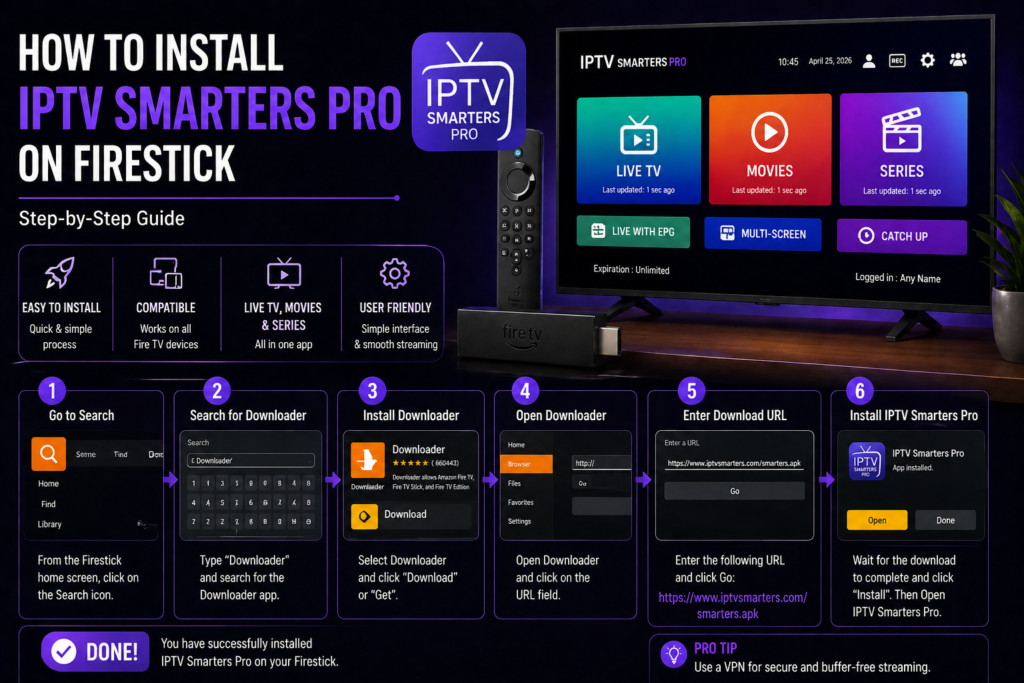
If you’re looking for the easiest way to stream IPTV on your device, learning how to install IPTV Smarters Pro on Firestick is one of the best things you can do.
The Firestick is one of the most popular streaming devices worldwide, and IPTV Smarters Pro is one of the most powerful IPTV apps available today. When combined, they create a smooth, flexible, and high-quality streaming experience.
In this complete guide, you’ll learn how to install IPTV Smarters Pro on Firestick step by step, even if you’re a beginner.
What is IPTV Smarters Pro?
Before diving into how to install IPTV Smarters Pro on Firestick, it’s important to understand what the app does.
IPTV Smarters Pro is an IPTV player that allows you to stream content using:
- M3U playlists
- Xtream Codes API
- IPTV provider login details
 Important: IPTV Smarters Pro does NOT provide content. You need an IPTV subscription.
Why Use IPTV Smarters Pro on Firestick?
Many users specifically search for how to install IPTV Smarters Pro on Firestick because this setup offers excellent performance.
 Benefits:
- Smooth streaming experience
- User-friendly interface
- Supports live TV and VOD
- Works perfectly on Firestick
- Easy to install and use
This combination is one of the best IPTV setups in 2026.
Requirements Before Installation
Before learning how to install IPTV Smarters Pro on Firestick, make sure you have everything ready.
 You’ll need:
- Amazon Firestick
- Stable internet connection (15–25 Mbps)
- IPTV subscription
- Access to Firestick settings
 Optional but recommended:
- VPN for privacy and stability
Why IPTV Smarters Pro is Not in the Amazon App Store
One of the main reasons people search for how to install IPTV Smarters Pro on Firestick is because the app is not available directly in the Amazon App Store.
This means you need to install it manually using a method called sideloading.
Don’t worry — it’s simple and safe if done correctly.
Step 1 – Enable Apps from Unknown Sources
The first step in how to install IPTV Smarters Pro on Firestick is enabling installation from unknown sources.
 Steps:
- Go to Settings
- Select My Fire TV
- Click Developer Options
- Enable:
- Apps from Unknown Sources
- ADB Debugging
This step is essential.
Step 2 – Install Downloader App
To continue with how to install IPTV Smarters Pro on Firestick, you need the Downloader app.
 Steps:
- Open Amazon App Store
- Search for Downloader
- Install it
- Open the app
Downloader allows you to install IPTV Smarters Pro easily.
Step 3 – Download IPTV Smarters Pro APK
Now comes the main part of how to install IPTV Smarters Pro on Firestick.
Steps:
- Open Downloader
- Enter the IPTV Smarters Pro APK URL
- Click Download
- Wait for the file to download
Make sure you use a trusted source.
Step 4 – Install IPTV Smarters Pro on Firestick
After downloading, continue the process of how to install IPTV Smarters Pro on Firestick.
 Steps:
- Click Install
- Wait for installation
- Open the app
- Delete APK file (optional)
Now the app is ready to use.
How to Set Up IPTV Smarters Pro on Firestick
Once you’ve learned how to install IPTV Smarters Pro on Firestick, the next step is setup.
Setup Process:
- Open IPTV Smarters Pro
- Select login method:
- Xtream Codes API
- M3U URL
- Enter your IPTV details
- Load channels
Within seconds, you’ll have access to your content.
Best Settings for IPTV Smarters Pro on Firestick
After installing IPTV Smarters Pro on Firestick, optimize it for best performance.
 Recommended Settings:
- Enable hardware decoding
- Adjust buffer size
- Update EPG regularly
- Organize favorite channels
- Clear cache occasionally
These tweaks improve performance significantly.
Common Issues and Fixes
Even after learning how to install IPTV Smarters Pro on Firestick, you may face some issues.
 Buffering
→ Check internet or IPTV provider
App not installing
→ Re-enable unknown sources
Login errors
→ Verify credentials
App crashing
→ Clear cache or reinstall
Best Devices for IPTV Smarters Pro
Although this guide focuses on how to install IPTV Smarters Pro on Firestick, the app also works on:
- Android TV
- Smart TVs
- Smartphones
- TV Boxes
Firestick remains one of the best options.
Is IPTV Smarters Pro Legal?
IPTV Smarters Pro is completely legal.
However, the legality depends on the IPTV provider you use.
Always choose reliable services.
Tips for the Best IPTV Experience
To get the most out of your setup:
- Use high-speed internet
- Prefer Ethernet over Wi-Fi
- Keep apps updated
- Use a VPN
- Choose a high-quality IPTV provider
FAQ – How to Install IPTV Smarters Pro on Firestick
 Is it difficult to install IPTV Smarters Pro on Firestick?
No, it takes only a few minutes.
Do I need Downloader?
Yes, it’s required for installation.
Can I use it without IPTV subscription?
No, you need a provider.
Is IPTV Smarters Pro free?
Yes, with optional premium features.
Conclusion – Install IPTV Smarters Pro on Firestick Easily
Learning how to install IPTV Smarters Pro on Firestick is one of the best ways to upgrade your streaming experience.
The process is simple, fast, and opens access to a huge range of content.
With the right setup, IPTV Smarters Pro on Firestick delivers a powerful and flexible entertainment solution in 2026.